The Missing Piece Link to heading
In the last post, I argued that Quarto’s .qmd format is the future of reproducible analysis documents in Python — plain text, git-friendly, and LLM-readable. And I stand by that completely for reports, publications, and any document where narrative and code interleave.
But I got a question I expected: “What if I actually like the notebook experience? I don’t want to write a document. I want to explore data interactively. I just want Jupyter to not be broken.”
Fair. And the answer is marimo.
What Is marimo? Link to heading
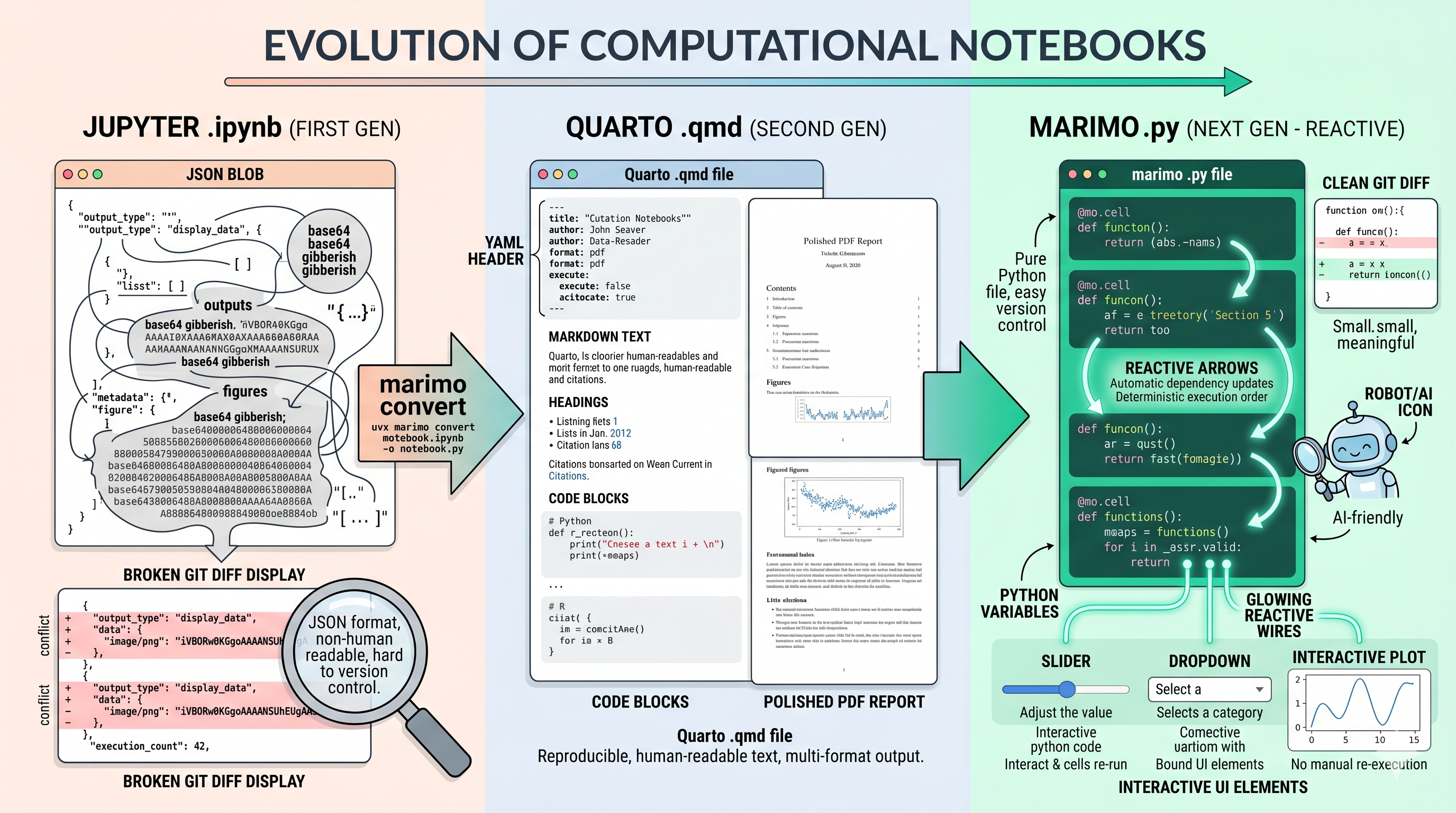
marimo is a reactive Python notebook — open source, first released in August 2023 — that reimagines what a notebook should be. The headline feature is simple but radical: every marimo notebook is stored as a pure .py file. Not JSON. Not markdown. Python.
Open a marimo notebook in any text editor and you’ll see regular Python functions. Each cell is a function. The notebook itself is a valid Python module. You can run it with python notebook.py, import functions from it into other scripts, and test it with pytest. It’s just Python, all the way down.
But the storage format is only the beginning. marimo also fixes Jupyter’s deepest architectural problem: hidden state.
Reactivity Solves the Reproducibility Problem Link to heading
In Jupyter, you can run cells in any order. Cell 5 might define a variable, Cell 3 might overwrite it, and Cell 8 might use a version that only exists because you ran things in a specific sequence during one Tuesday afternoon session. Restart the kernel, run top-to-bottom, and everything breaks. This is the hidden state problem, and it’s responsible for more broken analyses than any of us want to admit.
marimo eliminates this entirely through reactivity. When you run a cell, marimo automatically runs every cell that depends on its output variables. When you delete a cell, marimo scrubs its variables from memory. There is no hidden state. The execution order is determined by the dependency graph between cells, not by their position on the page.
This means a marimo notebook is always in a consistent state. Code, outputs, and program state are guaranteed to match. You never have to do “Restart Kernel and Run All” because the notebook is always “run all” — it can’t be anything else.
For bioinformatics, where analyses are long and complex and one wrong variable can silently corrupt downstream results, this is transformative.
The Git Story Link to heading
This is where marimo’s .py backend really shines for day-to-day work.
Run git diff on a Jupyter notebook and you get pages of JSON changes — cell metadata, execution counts, base64-encoded plot outputs. It’s essentially unreadable, and code review is impossible. Entire teams have adopted policies of “just don’t put notebooks in git” because the experience is so bad.
Run git diff on a marimo notebook and you see exactly what changed: three lines of Python code in one function. That’s it. Clean diffs, meaningful code review, proper collaboration through branches and pull requests. Version control works the way it’s supposed to.
This also means merge conflicts are manageable. Two people editing different cells produces a standard Python merge conflict that any developer can resolve. Compare that with trying to merge two Jupyter notebooks — a task so painful that most teams simply avoid it.
The LLM Angle: Why This Matters in 2026 Link to heading
Here’s where marimo pulls ahead of every other notebook format for modern workflows.
LLMs are increasingly central to how we write and debug code. Claude Code, GitHub Copilot, Codex — they all work best with plain text source files. A .py file is the native format that every LLM understands perfectly. There’s no JSON parsing overhead, no cell metadata to navigate around, no embedded outputs cluttering the context window.
But marimo goes further. The marimo pair command exposes your notebook’s full context — variables in memory, cell dependencies, execution state — to coding agents like Claude Code. This means your AI assistant doesn’t just see your code; it understands the reactive dependency graph, knows which variables are in scope, and can suggest changes that integrate correctly with the rest of your notebook.
I’ve been using Claude Code extensively across my work, and the difference between having it operate on a .py file versus a .ipynb file is substantial. With marimo’s Python backend, Claude Code can read, edit, and reason about the notebook as naturally as any other Python module. With Jupyter, it’s fighting the format before it even gets to the code.
Interactive Features That Beat Jupyter Link to heading
marimo isn’t just a better file format — it’s also a better notebook experience.
Built-in UI elements — sliders, dropdowns, tables, selectable plots — bind directly to Python variables with no callbacks required. Scrub a slider and every cell that references its value re-runs automatically. In Jupyter, achieving this requires ipywidgets, custom callback functions, and careful manual wiring. In marimo, it just works.
The dataframe explorer lets you apply transformations through a visual interface — drag and drop groupings, filters, and aggregations — and it generates the equivalent Python code for every step. For early-stage data exploration on scRNA-seq metadata, this alone is worth the switch.
SQL cells are first-class: write SQL that queries your in-memory DataFrames (backed by DuckDB), and the results land back in Python as polars or pandas DataFrames. It’s the kind of seamless data querying that R users take for granted with sqldf or dbplyr, now built directly into the notebook.
The Practical Workflow Link to heading
Getting started is straightforward:
# Install
pip install marimo

# Create a new notebook
marimo edit notebook.py

# Or convert an existing Jupyter notebook
marimo convert analysis.ipynb > analysis.py

# Run as a script
python analysis.py

# Deploy as a web app
marimo run analysis.py
That last command is worth emphasising. You can take any marimo notebook and serve it as a read-only web app with Python code hidden. Your collaborator or PI sees an interactive dashboard; you see the code. Same file, different modes. No Streamlit rewrite required.
Where marimo and Quarto Fit Together Link to heading
These tools aren’t competing — they serve different purposes in your workflow:
marimo (.py) is your exploration and prototyping environment. Interactive, reactive, immediate feedback. Use it when you’re figuring out your analysis, testing parameters, building data pipelines, or creating interactive tools for your lab.
Quarto (.qmd) is your production document format. Cross-references, citations, multi-format rendering, polished output. Use it when you’re writing your methods section, creating a supplementary analysis document, or producing a report for collaborators.
Jupyter (.ipynb) is the legacy format you convert from. marimo convert and quarto convert both accept .ipynb files, so your existing notebooks aren’t stranded — they’re just waiting to graduate.
The Bottom Line Link to heading
marimo is what Jupyter should have been. Reactive execution eliminates hidden state. Pure Python storage makes version control work. The .py format is natively readable by LLMs, enabling a quality of AI-assisted coding that JSON notebooks simply cannot match. And the interactive features — sliders, SQL cells, the dataframe explorer — make it a genuinely better exploration environment, not just a better file format.
If you love notebooks but hate what .ipynb does to your git history, your reproducibility, and your LLM workflows — marimo is the answer.
This wraps up the foundations arc of the series. We’ve covered polars for data wrangling, uv for environments, Quarto for documents, and marimo for notebooks. The Python ergonomic gap is closed.
Now the real fun begins. Next up: we dive into scanpy and the scverse ecosystem — preprocessing, clustering, visualization, and real biology. Same philosophy as always: biology first, code second.
See you there.