This series started with ls, a command most of us have typed thousands of times and never once questioned. The point was never that the old tools are bad. It was that their defaults were set decades ago, for different machines and different people, and most of us inherited them without noticing.
Ten posts later, each of those defaults has a better answer. This last post puts them all in one place: what each tool replaces, how to install the lot, a single block for your shell configuration, and one ordinary morning on a cluster where every one of them earns its place.
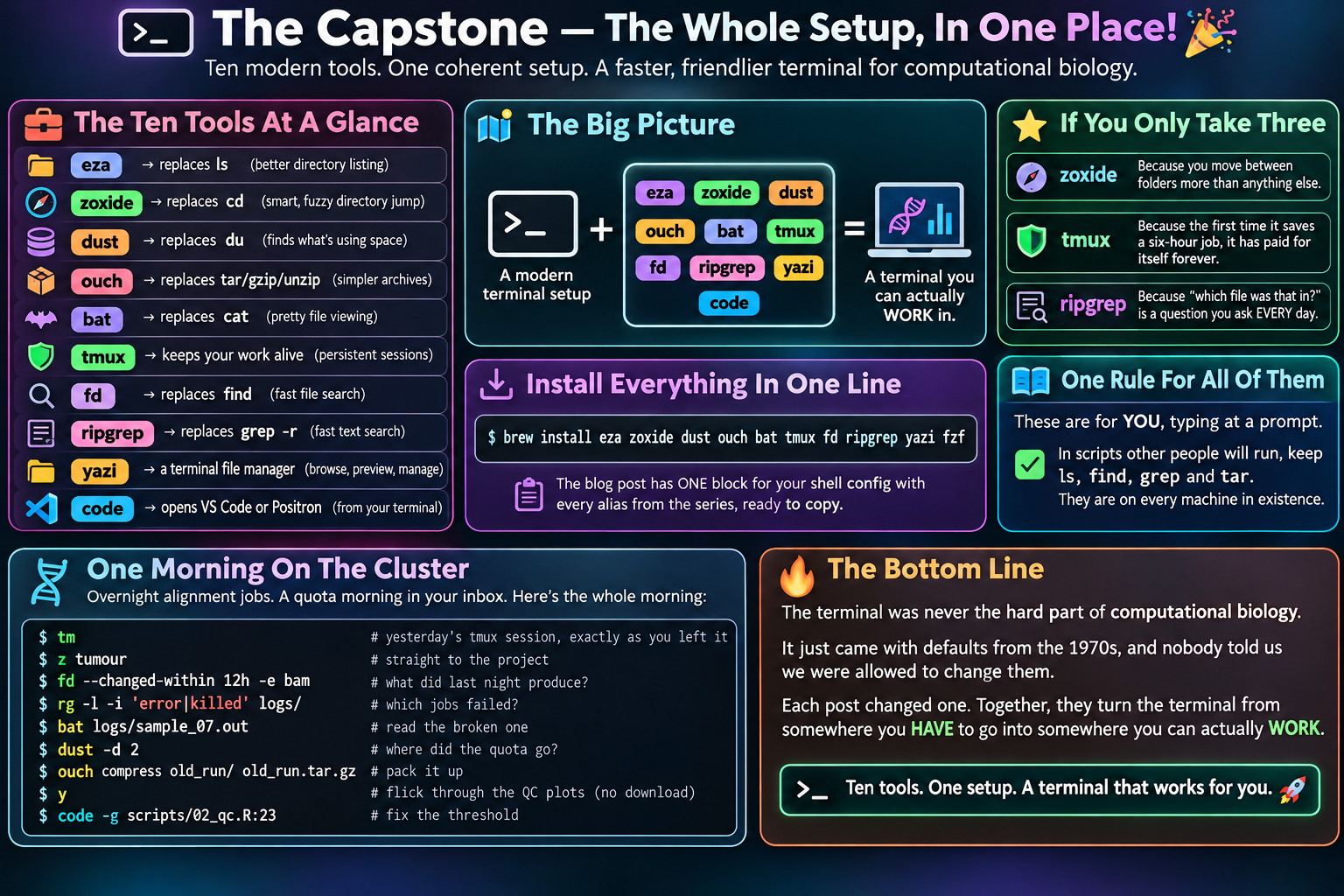
The ten tools at a glance 🧰 Link to heading
- eza: replaces
ls. Folders first, sizes you can read, git status at a glance. The one to remember:ll - zoxide: replaces
cd. Learns where you go and jumps there from a fragment.z spatial - dust: replaces
du. Shows where your quota actually went.dust -d 2 - ouch: replaces
tar,gzipandunzip. One syntax for every archive.ouch decompress file.tar.gz - bat: replaces
cat. The first look at any file, highlighted and numbered.bat samplesheet.csv - tmux: keeps your work alive when your connection is not.
tmux new -A -s main - fd: replaces
find. The search box the cluster never had.fd filtered - ripgrep: replaces
grep -r. Ctrl-F for every file you own.rg FindClusters - yazi: the Finder window, with zoxide, fd and ripgrep built in.
y - code: the bridge into VS Code or Positron.
code .
Install everything 🛠️ Link to heading
On a Mac with Homebrew, one line:
brew install eza zoxide dust ouch bat tmux fd ripgrep yazi fzf
fzf is the one tool here without its own post. yazi uses it for one of its jump keys, so it comes along for the ride. VS Code and Positron install like any other app; the code post covers switching on their commands.
On a cluster where you cannot install software, every setup section in the series has the same escape route: download the prebuilt Linux binary from the project’s GitHub releases page and put it in ~/.local/bin. tmux is often already there; check with tmux -V before you go looking.
One block for your shell configuration 📋 Link to heading
Everything the series asked you to add, in one place. Paste it into ~/.zshrc, or ~/.bashrc if your cluster uses bash, and open a new terminal.
# Tools you installed yourself
export PATH="$HOME/.local/bin:$PATH"

# eza (post 1)
alias ls='eza --group-directories-first'
alias ll='eza --long --git --group-directories-first'
alias lt='eza --tree --level=2'

# bat as the reader for manual pages (post 5)
export MANPAGER="sh -c 'sed -u -e \"s/\\x1b\\[[0-9;]*m//g; s/.\\x08//g\" | bat -l man -p'"

# tmux: always land in the same session (post 6)
alias tm='tmux new -A -s main'

# fd and ripgrep (posts 7 and 8)
alias fda='fd -uu'      # fd all, including gitignored data folders
alias rg='rg -S'        # ignore capitals unless you type one
alias rgu='rg -uu'      # rg unrestricted

# yazi: quit and stay where you browsed (post 9)
function y() {
    local tmp="$(mktemp -t "yazi-cwd.XXXXXX")" cwd
    yazi "$@" --cwd-file="$tmp"
    IFS= read -r -d '' cwd < "$tmp"
    [ -n "$cwd" ] && [ "$cwd" != "$PWD" ] && builtin cd -- "$cwd"
    rm -f -- "$tmp"
}

# jump to a project and open it in your editor (post 10)
zc() { z "$@" && code .; }    # Positron: swap code for positron

# zoxide (post 2): keep this as the last line
eval "$(zoxide init zsh)"     # bash: zoxide init bash
Two small notes. zoxide asks to be initialised at the end of the file, which is why it sits last. And if a tool is missing on a machine, its alias will fail loudly the first time you use it, which is a perfectly good reminder to install it.
One morning on the cluster 🧬 Link to heading
Here is what all of that looks like on an ordinary day. Overnight you left a batch of alignment jobs running, and an email from the cluster says you are close to your quota.
Pick up where you left off.
tm
Yesterday’s session, exactly as you left it: the same windows, the same scrollback, R still open in the second pane.
Get to the project and look around.
z spatial
ll
One word to get there, and a listing that shows folders first and which files changed since your last commit.
What did last night produce, and what failed?
fd --changed-within 12h -e bam
rg -l -i 'error|killed|out of memory' logs/
rg --files-without-match 'Finished' logs/
The new BAMs, the logs that reported a problem, and the jobs that died without saying anything at all.
Read the one that went wrong.
bat logs/sample_07.out
Highlighted, numbered, and paged, so the error near the bottom is easy to spot.
Deal with the quota email.
dust -d 2
fd -t f -S +5G
ouch compress results/old_run/ old_run.tar.gz
Where the space went, the files over five gigabytes, and last month’s run packed into one archive you can move off the cluster.
Check the QC plots.
y
Browse to the figures folder and arrow down through the plots in the preview column, without downloading a single one. Press D on the intermediate files you no longer need, remembering that d only moves them to a trash folder that still counts towards your quota.
Fix the threshold.
The plots say the mitochondrial cutoff is too strict for this tissue. Time to edit, so switch to your editor’s remote window, where code works:
rg -F 'percent.mt' scripts/
code -g scripts/02_qc.R:23
ripgrep finds the line, and the editor opens with your cursor on it.
That is ten tools in one morning, and not one of them asked you to remember a flag you look up every time.
If you only take three ⭐ Link to heading
Ten new tools at once is a lot. If you want to start smaller, these are the three that change the most:
- zoxide, because you move between folders more than you do anything else
- tmux, because the first time it saves a six-hour job from a dropped connection, it has paid for itself forever
- ripgrep, because “which file was that in” is a question you will ask every single day
Add the others when you notice the old habit annoying you.
One rule that applies to all of them 📖 Link to heading
Everything in this series is for you, typing at a prompt. When you write a script that other people will run, keep the standard tools (ls, find, grep, tar) in it. They are installed on every machine in existence, and your colleague’s cluster may have none of the ten. Your aliases do not apply inside scripts anyway, which is exactly as it should be.
The bottom line 🎯 Link to heading
Post 1 promised eight more posts. It turned out to be ten, which feels about right for a series about not settling for defaults.
The terminal was never the hard part of computational biology. It just came with defaults from the 1970s and no one told us we were allowed to change them. Each post in this series changed one. Put together, they turn the terminal from somewhere you have to go into somewhere you can actually work, on your own laptop or on a machine you have never physically seen.
Thank you for reading along. If one of these tools has quietly become part of your day, I would love to hear which one.